TDD A.K.A. Test Driven Development

If you came here with no reason, then stay this may be helpful to you someday, If you were looking for this exact topic that you are probably not in the right place, eventhough if you stay you will lear a few things and this could be kinda helpful to you so take a seat and enjoy about TDD.

For those who don’t know what TDD is, TDD stands for Test Driven Development, which is basically is a software proccess that stands on the repetition of various steps followed by a development cycle, the software is subject of very specific test cases that allows the user to have a controll over the software.

TDD follows a cycle that must fulfill the needs of a software in which stands

Add a test

Each new feature begins writing a test. The test defines a function or the improvement of an existing function. The developer must start by fully understanding the feature and its requirements. Some of the tests can be updates of an existing test. The use of tests before starting to write code lets the developer to focus on the requirements while writing code.

This is a gif of homer simpson testing something

Run everything and see if something fails

In this step the existing code is proven to see if the new test is passed. If the existing code passes the new test it means that the test is useless or flawed. The new test should always fail because there should not be code that fulfills the requirements yet.

This is a gif of two pokemon runnning

Code and do more code

The next step is to write the code to pass the test. It is not that important that the code is elegant or really well written. The most important thing is to pass the test. One thing you should consider is that the code must only fulfill the test and not add more functionality beyond that.
This is a gif of a binary code

Test it out once more

If all test cases now pass, then the new code meets the test requirements and doesn’t break any existing features.

Restructure your code

The last step in the cycle is to clean up the code. Move it when it is more convenient according to the structure of your system. Eliminate duplication and in general follow the OO principles you already know. Try that your code is readable and maintainable.
This is a gif of a cube restructuring

and Finally…. Repeat

You finish once process and start another one with the new structure of your code, try to implement better way to compute things and to make it easier for the computer in space and time complexity, then repeat and repeat until you feel that the software is exactly what you expected from it.

My own experience

This is a topic that I have not mastered yet, you can tell, but I had the privilege to talk to Kent Beck, who is the one that rediscovered the TDD technice a.k.a. back in the day as extreme programing, because you repeated every process and a specific task over and over again, this is definetely of the lest known process in software development and one of the most effective ones, this is probably the reason you came to this post, in order to know a little bit more about this proccedure, if you ended up here by accident I recommend you to start developing your projects this way, you will see the diference once you start implementing it.

References
https://en.wikipedia.org/wiki/Test-driven_development

Verify or not Validate that is the question

For some extrange reason we ended up in this entry of my blog, and for some weird reason we are going to keep reading this post, because in this post I will answer whether or not to verify and validate our software projects.

They may seem the same topic but the real truth is that there are some differences between these two, this is a topic that would probably discuss with someone else in the future, so this is why I do this post, to make sure that whoevers reads this article could win any discussion about verify or validate software.

The two terms are going to be all around your enviroment when making a software and everyone has their own definitions about the terms, eventhough I am not an expert I will try to do my best to explain you the differences and when you can apply these terms.

Verification

Verification is the process of evaluating work-products of a development phase, this doesn’t evaluate the final product. The evaluation done decides if the software satisfies the specified requirements of that phase.

This is a picture of patrick star from sponge bob building something wrong

Verification is done trough reviews, walkthroughs and inspections. These check if the software satisfies each of the requirements it should.

  • Plans
  • Requirement specs
  • Design specs
  • Code
  • Test cases

Activities that must be done withing

  • Reviews
  • Walkthroughs
  • Inspections

Validation

Validation is the process of evaluating software at the end of the development process to determine if it satisfies specified business requirements. It basically evaluates if the software does what the client needs, it is directly related to the specifications done at the beginning of the project, if these were wrong in the first place then the software won’t be validated.

This is a gif of sponge bob

There are two ways to perform software validation, internal and external. In the internal way it is assumed that the goals of the stakeholders were correctly understood, and if the software meets the requirement specification then it is internally validated. External validation happens when you ask the stakeholders if the software meets their needs.

Withint this term you evaluate the whole software

The only activity that you do with the software is test it out

My own experience

Verification and validation must seem the same thing at the beggining but once you see the main differences between them and the way that you aply those into your system everything becames much clearer, and is easier to decide where and how to aply these terms in our proyects, verification has to do more with how are we building the software, and validation has to do more with is the final product the one that we needed to deliver, definitely two terms that must be know by every person who tries to build up a project.

References

Verification vs Validation

Code Revision

This probably one of the main topic of software developing, code revision is a quality assurance method, in which the software is checked by reading the main parts of the code, how does the code implements itself, there are some restrictions that must be fulfilled when doing a code revision that are:

  • The reviewers must know what the software does
  • At least one of the reviewers must not be the software author, this because he will try to understand what other people did

Usually the code reviewers must try to discover some of the quality requiremets that are

  • Better code quality, improve the code’s quality by checking its redability, understability and uniformility
  • Finding bugs, find the main problems of the software, where the software can’t keep doing its functions
  • Learning, know the capabilities of the software and try to predict the software results
  • Find better solutions, this part is one of the most important because in this one reviewers can come up with better solution for certaint problems in order to help the time and space complexity of the software

There are some different types of reviewing proccess

Formal inspection

This is a gif of inspector gadget

This method involves careful and detailed execution withing multiple participants and phases, this is the most rudimental way of code review because a group of people join in place to check the code line by line, the pro of this method is that bugs are always easier to find because it is read line by line.

There is a document made at the end of the review that answers; who reviewed the code, when it happened, why was the reason of the review, which method did they checked, and the results of the revision, with this revision it is almost secure that something usefull about the code will be found.

Regular change-base

This is a more lightweight type of code review. This type uses something called Version Control, it is basically a system that records changes to a file or a set of files over the time. Github is one of the most popular applications that does this; the developers are constantly checking the changes made by every member of the team. They can see who is the responsible for the code and they can check it, but they do not dedicate the time to read it line by line.

Why code reviewing?

This is a why gif

Code reviews require a considerable investment of effort from the software developers. Especially formal inspection has been criticized for this. The needed effort has to be outweighed by an adequate number of detected defects.

My own experience

Bugs, not compiling errors, other results from the ones expected are some of the problems that we usually face when developing a software, in these cases the only way to solve it quickly is to debug the code to see where the error appears, this method is kinda confusing and a little bit slow, so this is why the code review proccess came out, to find a proccess that could find the bugs, reviewing could save your project from death, you find everything about your code.

Classes to code

In my previous blogs we have discussed about diagrams, UML, design patterns, and so far we have already seen the basis of software design and and some of the uses of UML in software representation.

Now with these representations lets learn how to convert from the class design learned in the last post and turn it into code capable of running and be implemented in the system.

new computer
This is a picture of a computer- Snickclunk

The only problem in trying to turn the diagrams into code is that if the diagrams are not well design or not understandable the code may be harder to code, and because diagrams are object oriented the code must be object oriented, that a must have requirement, otherwise the system must be harder to code even with the diagrams, with this the identity and functionality of the system will remain clean and keep the escence of your system.

There are some things to know before tryng to translate from classes to code:

  • Know your system, know how does your system works, its capabilities, its highs and lows, what can it do or not, this because you will have to translate your system
  • Know the way to translate, if you want to turn your classes into code first you need to know how are you going to do it, how are you doing it, know the paradigm and if the language supports your system capabilities
  • Take advantage of the information you have, literaly it is not hard to translate your system if you know all the comunication within, and the behaviour of your system
  • Know the atributes you will have to initialize in your code
  • Every methods name indicates what the class must do, as an example the buy method should let the user to buy something so a product, a client must be some of its elements
  • The inheritance in the system indicates how the classes communicates, the only thing you have to do is implement the design you already have
  • Enjoy your coding, don’t get frustrated if the first time you try to translate it it does’t work mistakes are made by everyone so get fun coding
Computer Eyewear
This is a picture of a keyboard- Saechang, M

My own experience

Through my experience I have faced many challenges while building a project, this because sometimes you code too much instead of analysing the system you want to build, so you have something like an spaguetti code that has no head no bot, and somethimes you analyze your system too much that when you want to build your project it actually becomes very hard to code so what you wanted your system to be seems almost imposible to code, so when you analize your code just enough and start to code just the needed you system becames wxactly what you wanted and if there still some free time you can try to add a few implementations to the system.

Classes to tables

In the previous entries we talked about how useful can UML be, this time we are going to focus in something a little different, we are focusing on database systems and how does we can represent it using tables.

When using a database system there is a situatin that happens everytime, and that is that variables and information shared in the system are not easy to read or easy to get, the comunication between the system and what does the system storages are information needed by the users, hard to get without using an organization system.

In order to map the objects in the system first you must start with the data atribute of the class, it is important to define how manny attributes of the system will be mapped, it can be from zero to any number.

Some of these elements in the system are used just for temporal calculations and are actually not necesarry to have on the database, this allows the user to decide wheter or not to include those elements in the tables.

Tables
This a picture of a table by Jurgen, L

The simples way to map elements of the sistem is to assign each attribute with a single column, in this way the data model and the physical model are very similar, the only diference is the key dependendiec between the two models.

Inheritance

Inheritance works as a tool when you are trying to organize a table into different inherited atributes of the system, basically the system must share a single aspect between the objects.

This a picture of an example of a inheritance table

In order to implement inheritance in the system there are three diferent ways in which a diagram can be represented by using inheritance division whose are:

Using one data entity for an entire class hierarchy

In this way you describe a single class into one diagram that contains all the atributes of the element, with the respective primary key, this because with this diagram all the information must be revealed in one table.

This is a picture of a one data table

Using one data entity per concrete class

With this way you can describe the data entity with the inherited atributed needed for the entity in order to get completely functional, the good part about this method is that all the infor is storaged in a single table, the problem is that if the data is modified all the children must be modified as well.

This is a picture of the diagram distributed in the inherited atributes

Using one data entity per class

In this way you create a table per class, every table includes a foreign key that is related to the superclass, this is a good option because it describes object oriented systems very well, and when you modify a class you don’t have to modify any other class, the only problem is that there are way too many tables.

This a picture of a model with three diferent classes

My experience

As you see when talking about a big project it is almost 100% of probability you should shot how does the data of the system comunicates, and how are the classes stuctured, it has happened to me in previous projects and with this type of diagrams the system becames easier to understand not only to the developerts but to every reader of the system, a must try way to describe how is the structure of the system.

References

UML Part 2

As we saw in the previous post, UML is the most common model used nowadays, because how easy to read and write the model is. The purpose of this post is not only to get you in contact with UML model but to let you know why should you start using UML as your default modeling languaje.

This time we are going to discuss about state diagrams, package diagrams and componen diagrams, whose are basicaaly UML diagrams that describes the project’s components in a more detailed way.

State Diagrams

State Diagrams AKA Statechart diagrams, are mainly used to describe the different states that of a componen in the systtem, it is called state machine diagram because it works like a machine, that describes the component’s state and does it change based on the events.

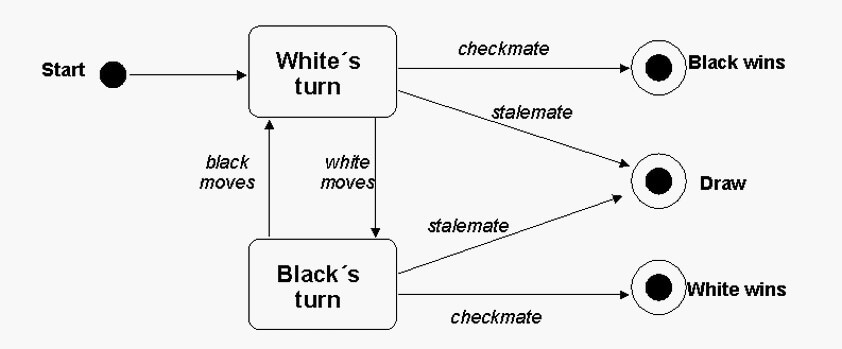
One easy way to understand how does state diagrams works is with this example of how does chess pieces move.

This a picture of a state diagram of the game chess

State diagrams are mainly used in back and forth projects like turn based games, and priority procedures.

Package Diagrams

A package diagram is a diagram that shows the organization of the elements in the system, within this diagram the information shown can be both structural or dependencial, with this model users are allowed.

This is a picture of a sales store package diagram

This diagrams are mainly used to organize large systems, which contains diagrams and documents, basically a collection of logical elements UML related.

Component Diagrams

When dealing with a big project usually we usually face the problem that componets are way to big and hard to describe them, component diagrams are usually used to break down the system into smaller pieces, this to make it easier to understand it.

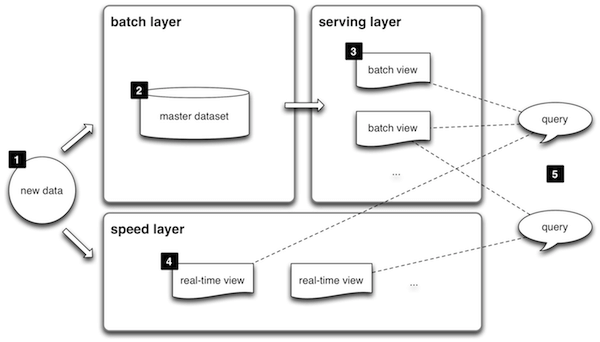
Lambda architecture is one of the best examples of how does component diagrams can be used, Lambda architecture is a complex architecture that be presented using components diagrams, easy to read and easy to understand, this system is commonly used by companies for storing and and processing data in the system, that is divided by three layers, speed, bathc and serving

This a picture of how the Lambda architecture is presented using component diagram

My experience

Uml is definetely my favorite modeling language to use, not because it is easy but because literally UML has ways to express any single detail of any project, this make it easier for the users to understand the functionality of the project, the components and their behaviour.

Probably this post is a little more explanatory about the components of UML, but this is because I want you to have a little more experience with the topic, and I am trying to invite you to use UML, I assure that you will see how easily and practical UML can be in every of your projects.

References

UML Part One

As you can see in my previous posts, I have already wrote about UML, which is a Modeling Language, for those who don’t know what UML means, it means Unified Modeling Language, as its definition says UML is a Languaje, that allow you to model the characteristics of a software, this is one of the most used models nowadays because this language describes the comuniation of the elements of any software in a way that everyone who sees a model in UML format can understand how does the software comunicates, It is easy to implement and easy to read.

During this post I am going to explain to you the basics of UML, and in the next post I am going to give you a more in-depth of UML, for now lets learn about: sequence diagrams, class diagrams and object diagrams.

Sequence Diagrams

These diagrams could be the most important diagrams in UML, because it is not only used in computer science but in many business application software, this because it can be readed by everyone.

As its name says a sequence diagram describes the sequence of events or interactions that the software follows, this happens between actors and objects, this is describes as a cronological manner that suggesta that every interactions must be completed before or after another interaction, it can be described as a must do before do something else method, which makes it easy to read and understand.

This is an example of a sequence diagram:

This is an image of a sequence diagram that describes the comunication between email and user-

Class diagram

Class diagrams are the most common UML diagrams for software documentation, this because it described object oriented programing software, and this methodology of programing is the most common nowadays this makes the class diagrams the most common diagrams in documentation.

Basically class diagrams contains classes, along with their atributes, and their behaviour, each class in the diagrams consists in three parts, the first one at the top being the name of the class, the second one in the middle being the atributes of the class, and in the bottom part the functions of the class, with this classes a line it is a attached to every class to inform the user what information does the class receives and sends to other classes, these to inform the comunication between classes in the software.

This is an example of class diagrams

This an image of a class diagram that describes the comunication between a customer and its order

Object Diagrams

This a little diferent from class diagrams, as we already saw, class diagrams are usefull because they describe object oriented softwares, but what exactly are objects, well objects are everything that the developer wants, a ball is an object, a bed is an object, everithing is an object and every objects has caracteristics and is made out of other things, can this other this be objects?, can a object be made out other objects? Well the answer is yes, anithing can be an object and and object can be made out of other objetcs, so in these diagrams every object is descibred by its functionality in the software.

In a real life example humans are objects with diferent characteristics and atributes, in order to get a job you must first give some information about yourself, just some of them because not all your information is required, to get a job you are asked to bring documents with your name, age, gender, birth date, hobbies, social status, health status, work experience, likes and things related to your capabilities at work, information like which is your favorite food is not required to get a job so eventhough your favorite food is something about you it is not needed, so the same as objects, in data science objects are made out of characteristics needed for the software, and not by every aspect of the object, these models describes the characteristics needed of an objects and how it is related to other objects.

This is an example of object diagram

This is an image of an object diagram that describes an User a data item, and how are these related.

My personal opinion

In this part we saw about the basics of UML, I can easily tell that this information is really helpful because it allows you to explain your software in a very detailed way, class and objects diagrams are like brothers that goes together everytime, in all of my projects I have made a class diagram and an object diagram in ordert to understand how exactly do I want my project to comunicate, because in these diagrams every single detail is shown, and that saves you a lot of time in trying to explain your software, these are the most common diagrams nowadays for a reason and that is because are easy to make, easy to read and understand and very helpful. I do advice you to try these diagrams once, you will notice a diference if you do so.

References

Ceta,N. (2019). All You Need to Know About UML Diagrams: Types and 5+ Examples. Tallyfy. Retrieved from: https://tallyfy.com/uml-diagram/#object-diagram

Design Patterns

Once you have started your carreer as a software engineering it is almost imposible not to hear about design patterns, and the more that you go further your career the more important this topic becomes.

In order to understan what a design pattern is, we must see the definition of pattern, a pattern can be describes as a repeated or singular way in which particular things are done, what this definitions ways is that a pattern is like a serie of steps that ,must follow an order.

We are going to make a bowl of cereal

  • First put the bowl
  • Then put the cereal
  • Then pour the milk in the bowl
  • Finally enjoy

This is the most common way to make a bowl of cereal, because in this way all the cereal gets milked, even though there are other ways to make a bowl of cereal, like pouring the milk before, the result may not be the same, or at least a little bit different than normal.

Cereal
This is a picture of a bowl of cereal by Annie Wang

Thats basically how a pattern works, and it is no different when we talk about design patterns in computer science, as we previously saw, design patterns are must not define the final product, but a serie of instructions that may lead you to the final product, defined as repetable solutions that allows users to solve common problems.

One of the best things about design patterns is that because they are meant to solve common problems, and common problems occur quite often, these patterns are always improving, which helps to make them more usefull.

There are two types of design patterns: structural or behavioral

Behavioral

rooftop pattern
A photo of a window pattern, by Lubomir Panak

This kind of patters focus in the object comunication patterns, which focuses on functions instead of rules, most commonly followed by:

  • Chain
  • Iterator
  • Mediator
  • Observe
  • State
  • Visitor

Structural

that´s life
A photo of a stair structure by ThatsLife

On the other hand, structural focuses on object and class compositions, in which it is defined the ways to compose new objects in order to obtain new functionalities

Some of the different methods in structural design are:

  • Separating object’s interface from it’s imlementation
  • Compose objects intro tree structures to easy manage
  • Add responsabilities to objects
  • Creating classes that represents a subsystem

My personal opinion

This is something that I definetely have struggled with, because when you are working in a colaborative project the way that your mind works is not the same as your partner, which means that most likely the way that you will work with the code is not going to be the same, this because you follow diferent design patterns, so it can turn out into an spaguetti code, in those cases I think that is really smart to have these kind of programmin strategies because with these design patterns you can divide the main functionality of the software into pieces that can be treated as individuals and finally merge them to obtain a full-well organized software, this is definetely a proccedure that I would consider using next time I’d have a software project.

If you want to know a little more about design patterns check out this video

This is a video of a brief introduction to design patterns by TechLead

REFERENCES

Object Oriented Design. (n.d). Design Patterns. Retrieved from: https://www.oodesign.com/

Source Making. (n.d). Design Patterns. Retrieved from: Souhttps://sourcemaking.com/design_patterns

Modeling Languages and Tools

In order to talk about modeling languages we firt define what a language is, language is a neurotipical process that allows people to organize and analyse diferent patterns, these will lead people to understand and replicate what others do, as an example a baby hears that everyone calls the woman who gave him birth «Mom», so he analises and replicates the sound, this how a language works.

The diference here is that the topic that I will explain in this post has nothing to do with babys, instead we will see how a computer will analyse and compare situations in order to create proccedures or develop a diferent context.

A modeling language is a graphical or textual computer language that is used to design models of new software or system.

tools
This a photo by This_is_m, it is a Mac computer

Modeling is an integral part of the software development process, this process allows to user to understand how the data works, the sofware structure and the states that the software will take. Worldwide there are a lot of modeling languages but the most common of all is known as UML, Unified Modeling Language, which describes the software with all of their functions and how the software communicates.

In other hands Textual Modelin Languages are quite popular nowadays, this because they are formalized natural languages that has the capability to describe the whole functionality of the sofware, this Modeling Language has to follow these simple requirements.

  • Easy to read: No matter who, everyone should be able to understand the main functionality of the software by reading the TML
  • Not ambiguous: If the TML is confusing it may cause some misunderstandings about the functionality of the software
  • Describe levels of abstraction: This is one of the main characteristics of the modeling language because it should be able to describe the software in a logical and physical enviroment

The main diferences between a Graphical Modeling Language, and a Textual Modeling Language is the way that each one describes the software

Graphical

This a picture of an UML desing made by me, it describes each method in the software and how are these conected

Graphical shows how the software communicates and and it’s method elements

Textual

This is a picture of a TML model describing the color and the shape of an item in a software

Textual shows every aspect of the item, including it’s characteristics

My opinion

I can easily say that I have used some of this modeling languages, but as I as I said, just some of them the one that I have the most experience with is definitely the UML, this because in my opinion is the best way to describe what the software can do, how does the software is connected, how the communication between methods work, the elements of the method and how does they work as one simple software, by the other hand I have never used any TML, not because I did not need to use them, instead because I have not known them yet, of course there are pros and cons about every model, but my recomendation is that feel free to use the one that you are more comfortable with, this because no matter what you are the one who is going to make the model, and is your project the one that needs to be explained in it’s more simple form.

References:

Martin, M; Macek, O (2012) On General-purpose Textual Modeling Languages, recovered from: http://ceur-ws.org/Vol-837/paper10.pdf References:

When to use Use Cases

Imagine that you have a project that you want to build, the only problem is that you don’t know when or how to start it, this when you can use Use Cases procedure.

Use cases is a method that allows the users to identify, organize and clarify the requirements of their projects. This method describes step by step what the user needs to accomplish in order to get a successful project, in each step there is a specific goal to accomplish and how to avoid mistakes, this method allows the user to decidir which path will he choose to create his product.

  • Organize the requirements
  • A sequence of follow up actions
  • Multi use model, if it worked for something it should work for something else
  • The vision of the goal of the product
the instant of success - had to snap a photo
Blake Patterson– This is a picture of one of the firsts Mac computers

How to use it

Fist of all the user needs to have a clear idea of what he is trying to achieve, Secondly, describe the process that he will follow in order to get the product, Thirdly, the user must check and re-check the product in order to give maintenance to the system, and Finally, repeat the process until the product achieves the main goal, previously established.

I will try to give an example of how can a use cases model can be used, We are going to use a normal shopping situation as an example

First of all describe the users, and their responsabilities.

  • Customer: look for an item, purchase item, cancel purchase.
  • Seller: look for an item, add item, delete item, ship item.

Once you have described the actions that can perform the users, now you must create a model with this actions, and relate the actions to the users allowed to realize them, this model should look like this.

This a picture of the use case model described in the last parragraph

Personal Opinion

This a nice way to represent the actions that the users are allowed to perform once your project is done, it is basically what your project must be available to perform and verifies the permisions and restrictions of users, in every big project development there must be a document that describes the main functionality of the project, the requirements, the goals, the process that needs to be followed in order to create a project, I consider this model to be an easy option to explain the permitions of the users, this is definetely an easier way to see the users potential.

At the moment I am working on a tennis project for one of my subjects, and in this project we must implement every topic that I am posting, for this example I woul like to show you how our use cases model looks like, this project allows the users to play tennis, the thing is that uour project is basically a datin app, just instead of dating users play tennis and get fun.

This a picture of an use cases model made by one of my colleages

If you want to know more about our project check my colleage Francisco’s post.

References

Brandenburg, L. (s.f) How to write a use case. Bridging the gap. Retrieved from: https://www.bridging-the-gap.com/what-is-a-use-case/